
Illustrated through a concept project: AI-Assisted Clinical Note Triage
I’ve spent years at the intersection of healthcare UX and product management, designing tools used by clinicians, care coordinators, researchers, and data teams. The work is complex, the stakes are high, and the timelines are never long enough.
AI changed that equation for me. Not by replacing my judgment, but by compressing the distance between an idea and a working prototype. I now spend roughly 20% of the time I used to on design execution, and I redirect the rest into product strategy, cross-functional alignment, and deeper stakeholder work.
This case study walks through my end-to-end process using a concept project I built to demonstrate it: an AI-assisted clinical note triage tool for hospital care coordinators.
The Problem This Tool Solves
Care coordinators in hospital settings manage large panels of patients, each generating a constant stream of unstructured clinical notes including physician observations, nursing updates, and specialist consults. The volume is unmanageable without structure.
The result: things fall through the cracks. Follow-ups get missed. Coordinators spend their cognitive energy parsing notes instead of acting on them. There’s no visibility into which patients need attention right now versus which can wait.
This tool addresses that directly. It applies AI to surface what matters, rank it by urgency, and present it clearly, while keeping the coordinator firmly in control.
My Process
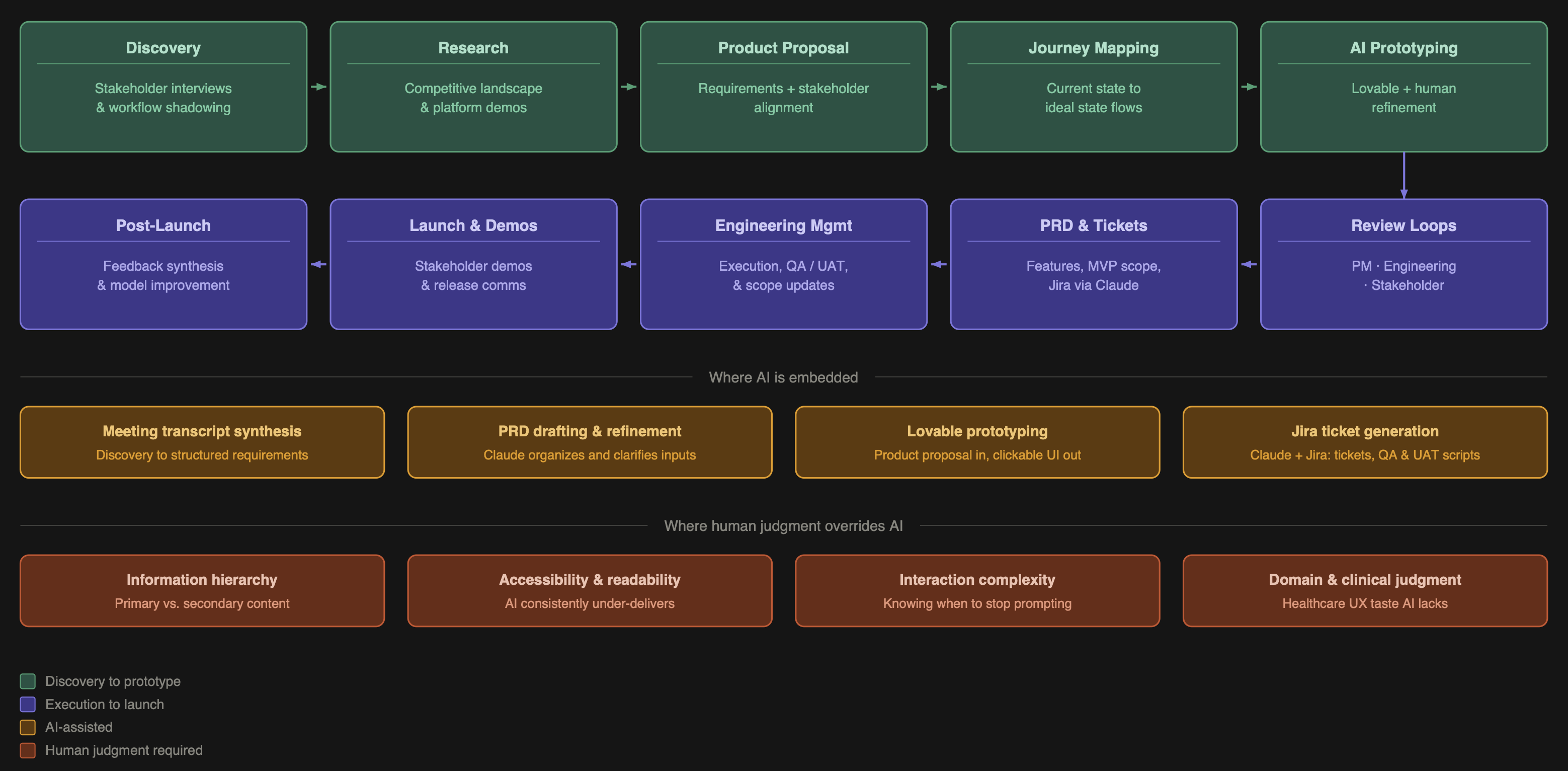
Phase 1 — Discovery
Every project starts the same way: I get as close to the real work as possible. I sit with stakeholders, shadow their workflows, and ask questions until I understand not just what they do but why they do it that way and where it breaks down.
For this concept, that meant mapping the full lifecycle of a clinical note from creation in the EHR through to coordinator action, and identifying exactly where coordinators lose time, miss context, or make decisions with incomplete information.
AI role: After each interview or shadowing session, I feed transcripts and notes into Claude to synthesize emerging requirements. This turns a 90-minute conversation into a structured list of needs in minutes.
Phase 2 — Research
I survey the competitive landscape to understand what tools exist, how they approach the problem, what they get right, and where they fall short. AI accelerates the initial scan, but I go hands-on for anything that matters, including requesting demos, reading research documentation, and talking to people who use competing products.
For clinical AI tools specifically, this step is non-negotiable. You cannot design a credible human-in-the-loop review workflow without understanding how other teams have approached AI trust, explainability, and error handling.
Phase 3 — Product Proposal
I consolidate everything including stakeholder needs, research findings, and my own synthesis into a product proposal document. This is a detailed requirements artifact covering what the product does, who it’s for, what problems it solves, and what it explicitly does not do.
AI role: Claude helps me draft and refine this document from raw inputs. I’m not asking it to invent requirements. I’m asking it to organize and clarify what I already know, and to flag gaps I may have missed.
I share this with stakeholders for alignment before writing a single line of interaction design. Sign-off here prevents expensive rework later.
Phase 4 — Journey Mapping
I map the user journey through the proposed product, covering both current state and ideal state, to pressure-test the requirements against real workflow logic. This stays human-led. Healthcare workflows are too domain-specific for AI to navigate reliably.
Phase 5 — AI Prototyping
This is where the workflow becomes genuinely different from traditional design practice.
I feed the product proposal document into Lovable and generate a clickable, visually structured prototype. What would have taken me two to three weeks in Figma takes hours.
But the output isn’t done. This is where my background as a trained designer and healthcare domain specialist becomes the product.
Information hierarchy: AI doesn’t know what a care coordinator considers primary information versus supporting detail. I restructure visual weight and progressive disclosure based on how coordinators actually think about patient priority.
Branding and visual language: Uploading a style guide or brand documentation at this stage dramatically improves the starting point, something I learned early on.
Accessibility and readability: AI-generated UIs consistently underperform here. Color contrast, type sizing, and information density all require active correction in clinical environments where mistakes have real consequences.
Complex interactions: Some interactions that seem simple, like a confidence score override with a reason field or an audit trail toggle, require disproportionate prompting effort. Knowing when to stop prompting and instead document the interaction spec for engineering is itself a skill.
The result is a prototype sophisticated enough for stakeholder review, built in a fraction of the traditional time.
Phase 6 — Review Loops
I run two distinct review cycles with different goals and different versions of the prototype.
Engineering review: Focused on feasibility, edge cases, and handoff clarity. The frontend scaffolding Lovable generates is useful signal for engineers. The backend and data logic is placeholder only and I flag it explicitly. I adjust scope here if I get pushback on complexity.
Stakeholder review: Focused on whether the product solves the right problem and whether the workflow feels right. I show enough to communicate primary user actions clearly. I don’t sink time into fine-tuning things that are already specced in the requirements and can be talked through in conversation.
Phase 7 — PRD, Tickets, and Execution
From aligned prototype to engineering handoff, I produce the full PRD, break requirements into features, prioritize MVP versus future versions, and generate Jira tickets via a Claude integration.
I manage engineers through execution, updating prototypes when scope changes and maintaining a living product roadmap. AI assists with QA scripts, UAT documentation, stakeholder demo materials, and feedback collection frameworks.
Phase 8 — Post-Launch
After launch I run a structured audit covering what shipped, what worked, what didn’t, and where the AI model can be improved based on human override patterns. Override rate is one of my most important signals. It tells you where the AI is miscalibrated and what training data you need.
What AI Gets Wrong, and Why That’s the Point
The value of this workflow isn’t that AI does the work. It’s that AI compresses the parts of the work that don’t require my expertise, freeing me to apply judgment where it actually matters.
Here’s what AI consistently gets wrong that I consistently fix:
Information hierarchy:
AI generates interfaces where everything looks equally important. In clinical tools, that’s a patient safety issue. Deciding what catches the eye immediately, such as urgency level, patient name, and recommended action, versus what lives in a collapsed secondary panel is a design decision grounded in deep user knowledge.
Accessibility:
Color contrast ratios, type sizing for users working across device types in variable lighting conditions, and touch target sizing for tablet use in clinical settings are not AI defaults. They are mine.
Interaction depth:
A feature like a flag for human review with a reason field that feeds back into model training sounds simple. Getting it to behave correctly in a prototype takes significant prompting investment. Knowing when the prototype is good enough to communicate the concept and when to stop and write the spec instead is judgment, not prompting.
Scope creep from AI output:
Lovable frequently generates features I didn’t ask for. Some of them are genuinely good ideas worth keeping in a future version. Evaluating that in real time against MVP constraints is a product management decision.
Code quality for engineering handoff:
Frontend structure is useful. Backend logic is not. I’m explicit with engineers about what in the prototype represents real interaction intent versus dummy scaffolding.
Key Metrics I’d Track
- – Time saved per coordinator per day
- – Reduction in missed follow-ups
- – Override rate, meaning how often coordinators correct AI output
- – AI confidence score accuracy over time
- – User adoption and engagement rate
- – Model improvement driven by human feedback loops
What This Workflow Makes Possible
Lovable reduced my design execution time by approximately 80%. That’s not a claim about AI being better at design. It’s a claim about where my time is most valuable.
The time I recovered goes into product strategy, cross-functional alignment, earlier discovery, and more rigorous stakeholder work. The product is better because I’m spending more time thinking and less time pushing pixels.
I’m actively building toward a fully AI-native PM practice, embedding generative AI across the entire product lifecycle from the first stakeholder conversation through to post-launch iteration. This case study is a snapshot of where I am now.